Below the project information is the Building Envelope section, with a separate sub-table for each envelope component. Every project shows all the tables. The count badge next to each section header shows how many rows you’ve added.
What’s required?
Ekotrope CODE doesn’t require any specific component to be present. The only hard rule is that the total UA has to come out positive, which means at least one component needs a row with a real surface area. In practice:
- Only model components that are part of the building thermal envelope, the boundary between conditioned (heated and cooled) and unconditioned space. For example, the wall between conditioned space and an attached garage is part of the thermal envelope; the wall between the garage and outside is not. Ekotrope CODE counts every component you enter, so don’t add components that lie outside the envelope.
- Add rows to whichever tables apply to your home. A slab-on-grade home has no Foundation Walls. A single-story ranch has no Skylights. Leave tables that don’t apply empty.
- Most homes will have walls, ceilings, and floors at minimum. If all three are empty, the calculation can’t produce a valid result.
- You don’t need a placeholder row for tables you’re skipping.
The component tables
Common tables include:
- Slabs. Slab-on-grade floors.
- Framed Floors. Floors over unconditioned space (vented crawlspaces, garages) and cantilevered floors.
- Foundation Walls. Basement walls and conditioned crawlspace walls.
- Above-Grade Walls. The exterior walls of the conditioned space.
- Ceilings. Flat ceilings, vaulted ceilings, and cathedral roof assemblies.
- Opaque Doors. Solid exterior doors.
- Windows or Glass Doors. Fenestration by type.
- Skylights. Horizontal or sloped roof glazing.
Adding a row
Click + Add [Component] at the bottom of any table. For example, + Add Slab, + Add Framed Floor, or + Add Window or Glass Door. Each row gets an auto-generated ID like S1, FF1, W1, or WN1.
What you fill in depends on the component type. There are four families of inputs: Slabs, Assembly components, Foundation Walls, and Openings.
Slabs
For slab-on-grade rows, enter:
- Area (ft²)
- Perimeter (ft)
- Perimeter Insulation R: R-value of the slab edge insulation
- Perimeter Insulation Depth (ft): how deep the edge insulation extends
Ekotrope CODE looks up the F-factor for you using ASHRAE 90.1 Appendix A. You don’t need to enter a U-factor for slabs.
Assembly components
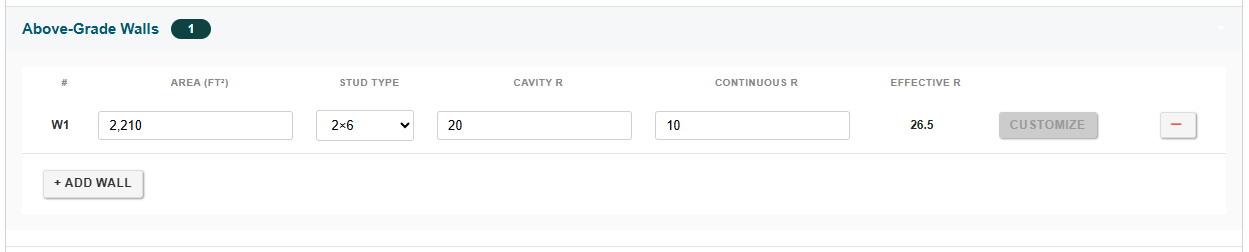
For Framed Floors, Above-Grade Walls, and Ceilings, enter:
- Area (ft²)
- Stud Type (dropdown, e.g., 2×4, 2×6)
- Cavity R: insulation between the studs or joists
- Continuous R: sheathing or exterior insulation
The Effective R column shows the resulting R-value after Ekotrope CODE applies the framing factor and combines the cavity and continuous insulation. You don’t enter it directly.
Ceilings have one extra input: a Ceiling Type dropdown (Attic, Vaulted, and so on) before the Area field. Pick the type that matches the ceiling assembly.
Enter the gross area. For walls and ceilings, enter the full gross area (including any window, door, or skylight openings). Ekotrope CODE automatically subtracts the rough openings of any windows, glass doors, opaque doors, or skylights you’ve assigned to that wall or ceiling, so you don’t need to do that math yourself.
V1 note: The Customize button on each assembly row is reserved for a future release. It’s visible but not active yet, so for now stick with the standard inputs (Stud Type, Cavity R, Continuous R).
Foundation Walls
Foundation Walls have their own input pattern because they straddle the ground line. For each row, enter:
- Perimeter (ft): linear feet of foundation wall.
- Height Above Grade (ft): how much of the wall sits above ground.
- Depth Below Grade (ft): how much sits below ground.
- Insulation Depth (ft): how far down the wall the insulation extends. Allows partial insulation (for example, top half only).
- Continuous R: R-value of the insulation.
The Effective R column is computed. Behind the scenes, Ekotrope CODE divides the wall into thin vertical slices, applies depth-dependent soil R-values to the below-grade portion, and adds your continuous insulation R wherever the insulation reaches. You don’t have to do that math yourself.

Openings
The three opening tables (Windows or Glass Doors, Opaque Doors, Skylights) each have slightly different inputs.
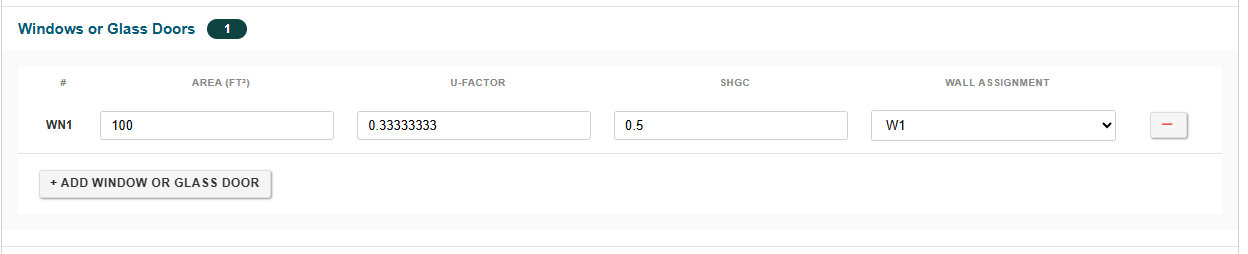
Windows or Glass Doors
- Area (ft²)
- U-Factor: the NFRC-rated whole-window U-factor (frame + glazing combined)
- SHGC: Solar Heat Gain Coefficient. The IECC requires it in cooling-dominated zones, but it isn’t part of the UA math.
- Wall Assignment: dropdown linking the window to an Above-Grade Wall row.
Opaque Doors
- Area (ft²)
- R-Value: opaque doors are entered as R-value (not U-factor) and have no SHGC.
- Wall Assignment: dropdown linking the door to an Above-Grade Wall row.
Skylights
- Area (ft²)
- U-Factor
- SHGC
- Roof Assignment: dropdown linking the skylight to a Ceiling row (since skylights penetrate the roof, not a wall).
Add walls and ceilings first. The Wall Assignment and Roof Assignment dropdowns only list rows you’ve already entered. If you start with windows or skylights, the dropdowns will be empty.
Totals update as you type. There’s no Calculate button to press.
Was this article helpful?
That’s Great!
Thank you for your feedback
Sorry! We couldn't be helpful
Thank you for your feedback
Feedback sent
We appreciate your effort and will try to fix the article