The top section of the page is titled Project Information. Three fields are required (marked with *): Project Name, Zip Code, and Builder. The rest are optional but worth filling in for clean reports.
| Field | What to enter |
|---|---|
| Project Name * | A label for your records. For example, “Lot 14, Maple Street” or “Smith Residence”. |
| Address | Street address. Click the icon at the right of the field to look it up on a map. |
| City | City name. |
| State | State dropdown. |
| Zip Code * | The home’s zip code. This drives the climate zone, which Ekotrope CODE uses to look up the prescriptive Reference UA. |
| County | Auto-populated from the zip code. You don’t enter it. |
| Target Energy Code | Dropdown of supported IECC versions (e.g., IECC 2024 Prescriptive, IECC 2021 Prescriptive). Pick the one your jurisdiction has adopted. |
| Builder * | Builder name. Appears on the compliance PDF. |
| Permit Date | Optional date field. Useful for tying the project to a specific permit submission. |
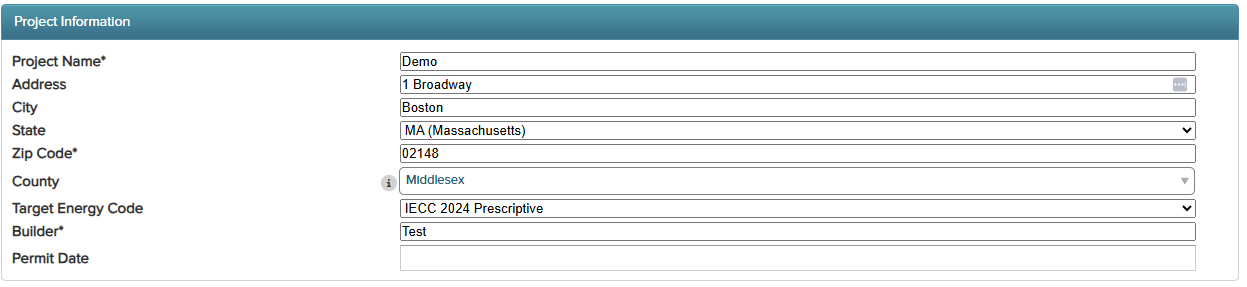
Zip code and state do the heavy lifting. Once you enter a zip code, Ekotrope CODE auto-populates the county and uses the climate zone behind the scenes to look up the right prescriptive Reference UA for your Target Energy Code. Selecting a state also auto-updates the Target Energy Code dropdown to include any state-specific codes that apply.
Was this article helpful?
That’s Great!
Thank you for your feedback
Sorry! We couldn't be helpful
Thank you for your feedback
Feedback sent
We appreciate your effort and will try to fix the article