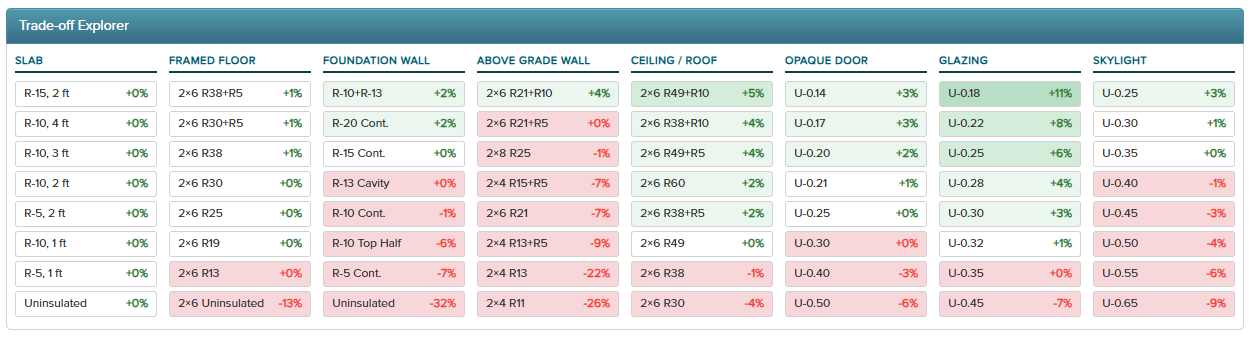
At the bottom of the page is the Trade-off Explorer. It’s a grid with one column per component type (Slab, Framed Floor, Foundation Wall, Above Grade Wall, Ceiling / Roof, Opaque Door, Glazing, Skylight). Each column lists alternative values for that component, with a delta percentage showing how the home’s margin would change if you applied that alternative.
- Green cells are improvements: your home would move further toward (or further into) below Reference UA.
- Red cells are worsenings: your home would move closer to (or further into) above Reference UA.
- The percentage is the change to the current margin, not the resulting margin itself. So if you’re currently 11% above Reference and you see +22% green on a wall option, applying that wall would put you roughly 11% below Reference (passing).
V1 note: The Trade-off Explorer is display only. It shows the “what if” numbers but doesn’t apply changes. To act on a tradeoff, edit the component row above to match the alternative you want.
Common ways to use it:
- You’re failing by a small margin and want to know which single upgrade gets you over the line.
- You’re passing comfortably and want to find the cheapest assembly to relax (for example, going from triple-pane to double-pane windows) while still passing.
- You’re comparing two insulation strategies and want to see the UA effect of each.
Was this article helpful?
That’s Great!
Thank you for your feedback
Sorry! We couldn't be helpful
Thank you for your feedback
Feedback sent
We appreciate your effort and will try to fix the article