Ekotrope allows you to input a custom utility rate schedule for your projects. You can edit the utility rates for Electricity, Natural Gas, Propane, Oil, and Wood under the Project Info > Utility Rates menu.
Using the utility rates editor, you can enter a custom schedule for your home's fuel pricing with a Chron String. You can specify alternate rates for different periods of the year by adding additional seasons, as well as adjusted rates when the home reaches higher tiers of consumption. You can read more about how to input a Chron String in this help article. We also recommend checking out Crontab.io, an independent tool that will express your Chron Strings in long form, so you can doublecheck your inputs.
One thing to note: custom utility rates are used for the annual energy bill under the Quick Results, for the HERS Rated Home, and several other programs. Custom rates are not used for IECC Performance code calculations, see this article for additional details.
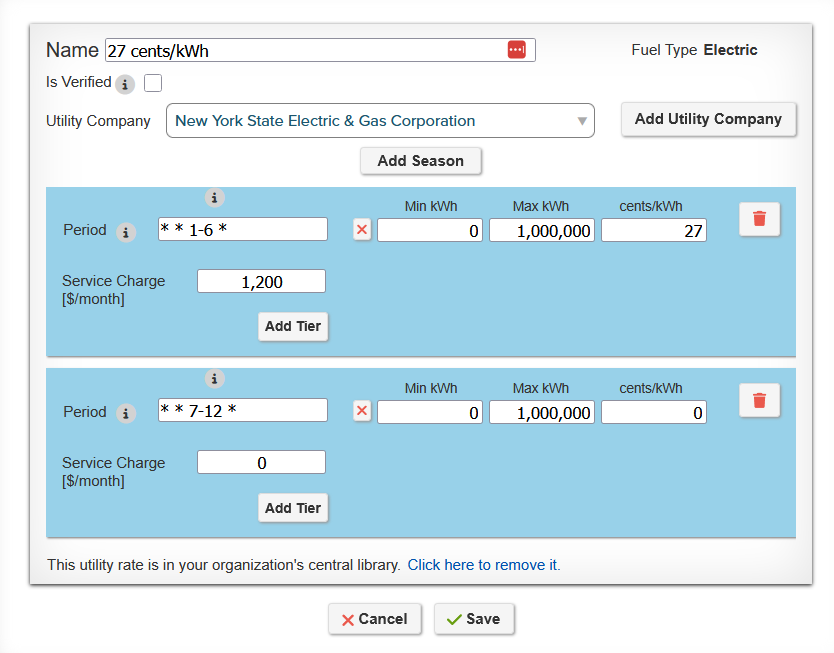
Our utility rates editor, with multiple seasons.
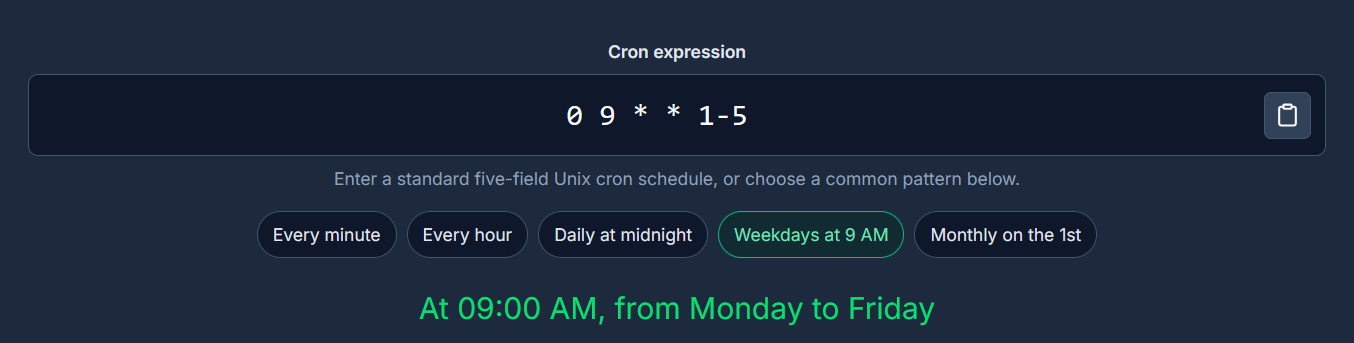
Chrontab.io, the inputted Chron String is expressed as a phrase below.
Was this article helpful?
That’s Great!
Thank you for your feedback
Sorry! We couldn't be helpful
Thank you for your feedback
Feedback sent
We appreciate your effort and will try to fix the article