MA State Energy Code Support in Ekotrope
Overview
In collaboration with MA DOER, Ekotrope has developed enhanced support for all applicable Residential New Construction Compliance Pathways in the state. This support will allow for clear and streamlined code compliance determination for projects. To get started utilizing these new features:
- Ensure the new “MA Energy Code” tab in Project Info section is fully populated where applicable.
- Ensure Permit Date and Construction Type Fields are populated. See below for additional guidance.
- Ensure new Code Options are enabled in the Quick Results panel. See below for guidance.
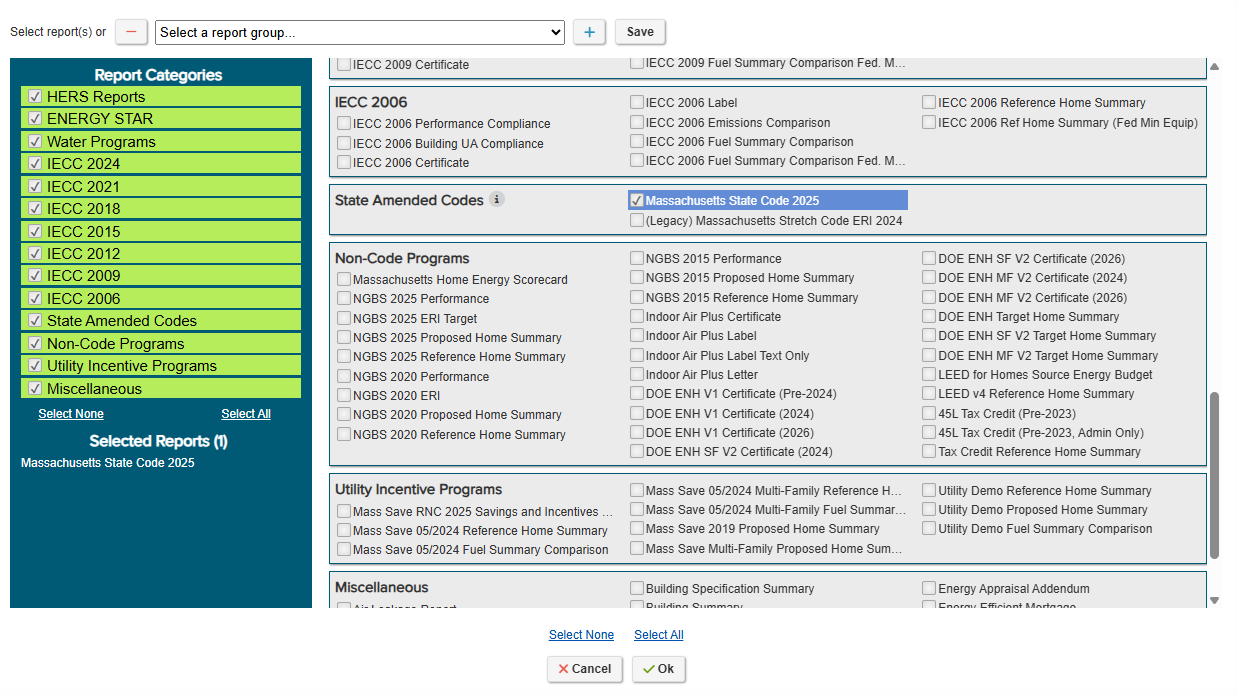
- Enable “State Amended Codes” as a Report Category and view the “Massachusetts State Code” report to review compliance with applicable code pathway.
Online Intake Tool
To support all MA Residential New Construction Energy Code compliance pathways, Ekotrope has incorporated a new tab, visible to all Raters with Ekotrope projects in Massachusetts, in the project info section labeled “MA Energy Code”. This tab facilitates additional data collection and compliance verification fields used in determining both the correct applicable code pathway and minimum requirements as well as verifying compliance with alternative or optional pathways and requirements.
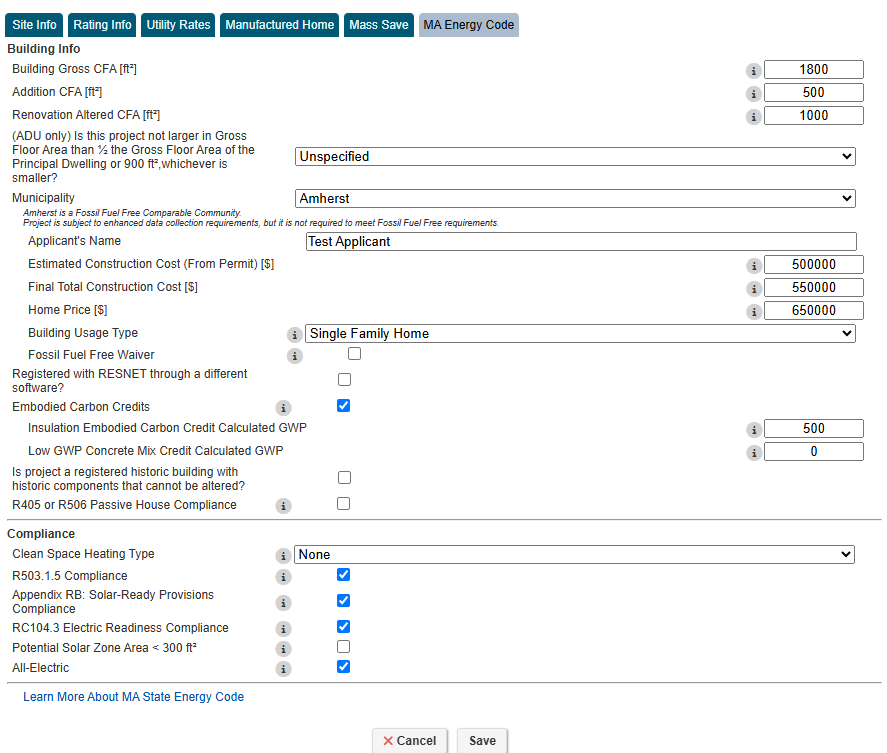
Form Fields in MA Energy Code Tab
- Building Gross CFA [ft2]- Used to collect total building Conditioned Floor Area for 2+ Unit buildings.
- Addition CFA [ft2]- Enter Addition CFA (if applicable). Used to determine code compliance path for projects with Additions.
- Renovation Altered CFA [ft2]- Enter Altered Renovation CFA (if applicable and renovation meets requirements for an Extensive Alteration). Used to determine code compliance path for existing buildings being renovated.
- Municipality - Used in combination with Permit Date to determine applicable minimum code requirements based on Municipality adoption.
- (ADU only) Is this project not larger in Gross Floor Area than ½ the Gross Floor Area of the Principal Dwelling or 900 ft²,whichever is smaller?
- Fossil Fuel Free Additional Data Collection Fields – Visible only if Municipality selected is participating in the Fossil Fuel Free (FFF) pilot or is a Comparable community for the FFF pilot.
- Applicants Name – Name of Homeowner or Builder
- Estimated Construction Cost (From Permit) – Estimated construction cost provided to Municipality Permit Office.
- Final Total Construction Cost ($) – Final costs of home provided by builder.
- Home Price ($) – Price home is listed for sale
- Building Usage Type – Building type in alignment with Energy Star Portfolio Manager Property Types.
- Fossil Fuel Free Waiver – Check only if project granted an exemption from FFF requirements if in a FFF community. Removes FFF code compliance requirements.
- Registered with RESNET through a different Software – If project was registered with RESNET in a software other than Ekotrope, select this box to enter RESNET Registry ID.
- Embodied Carbon Credits – Selecting "Yes" and entering the Calculated GWP for Insulation or Low GWP Concrete applies a 3-point HERS credit to the project's target HERS Score per R406.5.1(2) of 225 CMR 22.00.
- Is project a registered historic building with historic components that cannot be altered?- Check box if applicable.
- R405 or R506 Passive House Compliance- Check box if project is compliant with R405 or R506 for Passive House Compliance. Checking will bypass compliance verification checks for Stretch or Specialized Opt-In code where applicable. Ekotrope does not verify Passive House Compliance.
- Select chosen certification standard if checked:

- Clean Space Heating Type - Select Clean Space Heating option if pursuing Option 2 from subsection R406.5.1 of 780 CMR 10th Edition
- R503.1.5 Compliance- Check if project is a Major Alteration meeting criteria outlined in Section R503.1.5 of 225 CMR 22.00
- Appendix RB: Solar-Ready Provisions Compliance - Check if project is compliant with Appendix RB: Solar-ready Provisions of MA 225 CMR 22.00
- RC104.3 Electric Readiness Compliance - Check if project is compliant with RC104.3 Electric readiness of MA 225 CMR 22.00
- Potential Solar Zone Area < 300 ft^2 - Check if utilizing exception for potential solar zone area from RC104.4 of MA 225 CMR 22.00
- All-Electric - Check if the project is an All-Electric Building as defined in MA 225 CMR 22.00: A building with no on-site combustion equipment for fossil fuel use or capacity including fossil fuel use in space heating, water heating, cooking, or drying appliances. This box must be checked to meet All-Electric credits and requirements.


Other Key Data Fields
- Permit Date – Located in Rating Info Tab of Project Info section. Used determination of Code Applicability.
- Updated Definition: “The date the building permit application was accepted by the municipal building inspection department for this project.”
- Construction Type – Located in Site Info section of Project Info Tab. Used to adjust compliance requirements and Minimum HERS Index specific to specified Construction Types:
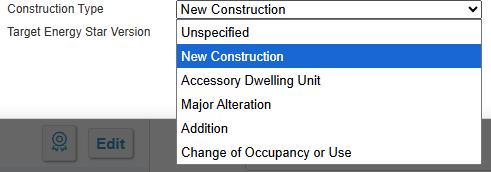
- More information Construction Types is available HERE .
Quick Results
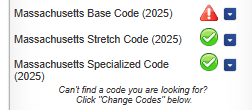
New MA Code Compliance Pathways are now available for the Massachusetts Stretch Code (2025), Massachusetts Specialized Code (2025), and the Massachusetts Base Code. The New Stretch Code and Specialized Code pathways are applicable to projects with a permit application acceptance date on or after 2/14/2025 if the Municipality the project is in has adopted the Stretch or Specialized code prior to that date. Otherwise, the codes are applicable based on when a Municipality has adopted the Stretch or Specialized codes.
Change Codes
To view these new code options in the Quick Results Panel, you may have to add the code options by navigating to Change Codes at the bottom right of the Quick Results Panel and selecting the new Codes:
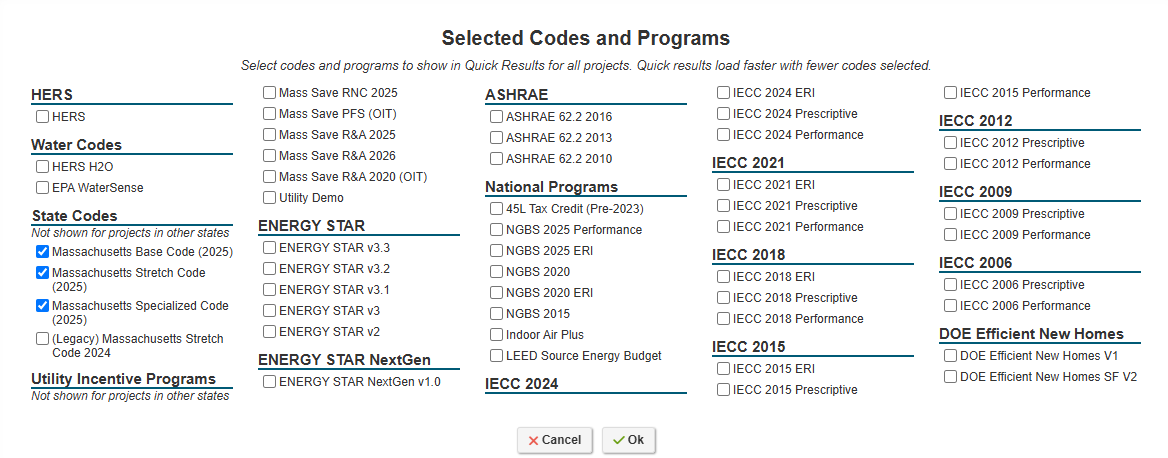
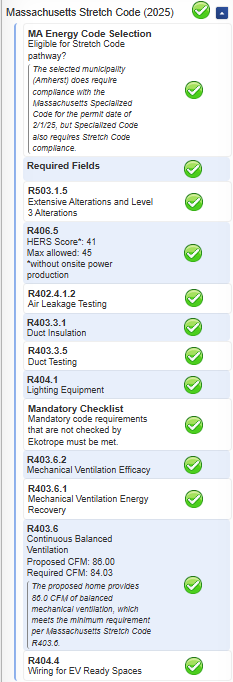
Ekotrope will show compliance with applicable code and compliance requirements based on Municipality, Permit Date, Construction Type, and modeled performance for the home.
Compliance Reports
Massachusetts State Code Report
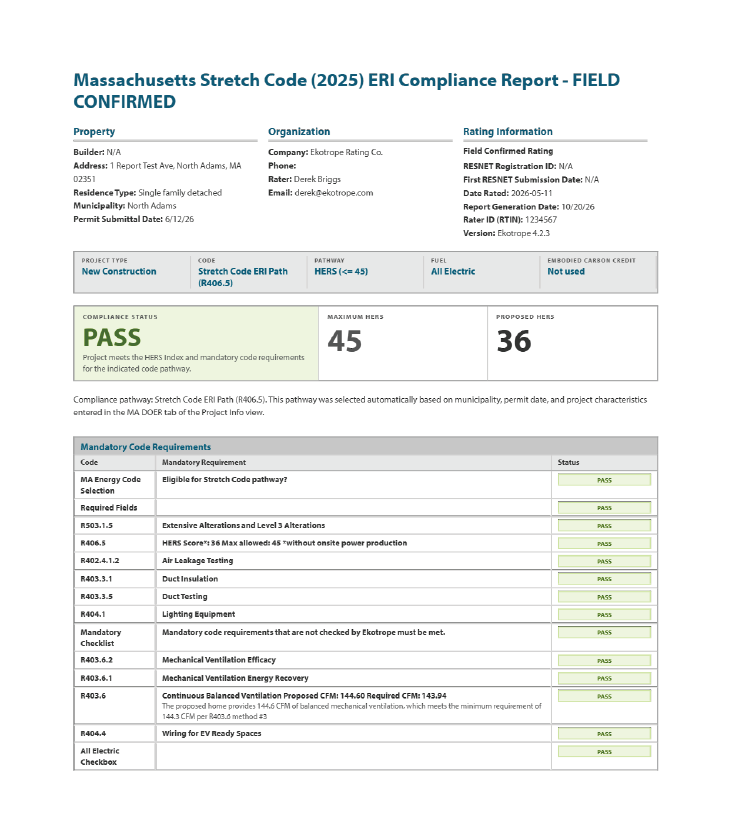
A new compliance report is now available in the “State Amended Codes” Report Category labeled “Massachusetts State Code” Selecting and generating this report will generate a compliance report that dynamically adjusts to show the applicable code pathway for the project based on Municipality, Permit Date and Construction Type. This eliminates the need for the user to select the correct applicable report for a project.
For example, a project permitted in Arlington, MA which is both a Specialized Opt-In community and a Fossil Fuel Free Community will see the “Massachusetts Specialized Code (2025) ERI HERS Report” generated outlining the Specialized Opt-In and Fossil Fuel Free Compliance requirements.
To generate a Passing Confirmed MA Energy Code Compliance Report, the project must meet all compliance requirements for the applicable code pathway, populate all required fields in Ekotrope including Permit Date, Construction Type and applicable fields in the MA Energy Code tab. Additionally, the project must be registered with RESNET or the RESNET Registry ID must be provided in the MA Energy Code tab if registered with RESNET in an alternative software.
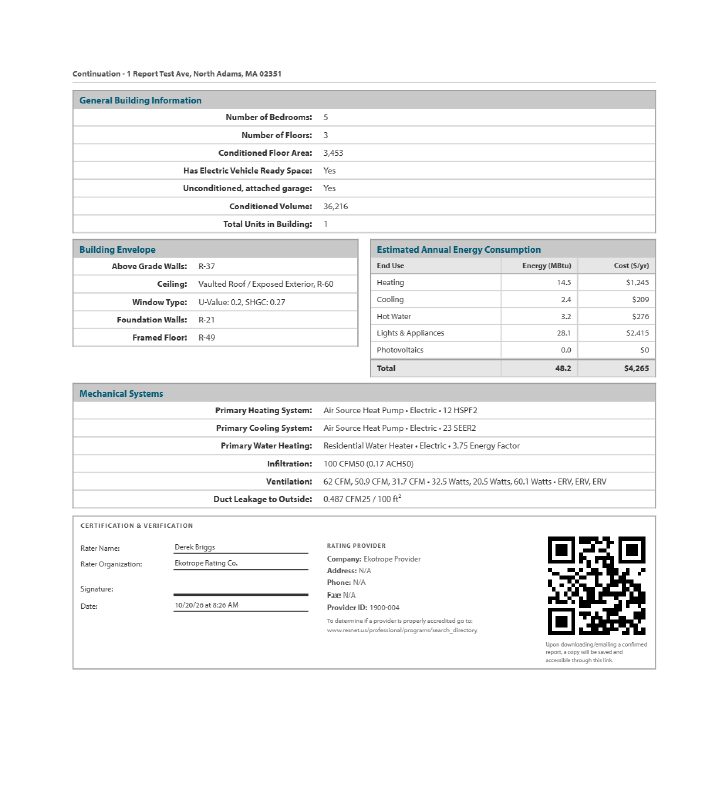
Confirmed Report QR Codes
Upon downloading/email a confirmed report, a digital copy of the report will be saved and accessible via a QR code generated at the bottom of the report. This digital version will be accessible to anyone scanning the QR code.
Was this article helpful?
That’s Great!
Thank you for your feedback
Sorry! We couldn't be helpful
Thank you for your feedback
Feedback sent
We appreciate your effort and will try to fix the article