How to import an RSU design into Ekotrope
Ekotrope's EnergyGauge importer accepts .enb files, so moving an RSU design into Ekotrope uses the same export steps you would use to send a file to Ekotrope from EnergyGauge. RSU writes an .enb file that Ekotrope reads directly..
Before you start
Your organization needs EnergyGauge importer access enabled in Ekotrope. If you don't see the Import from Other Software option on your My Projects page, send us an email at support@ekotrope.com and we'll enable it for your account.
Step 1: Open the Code Compliance export in RSU
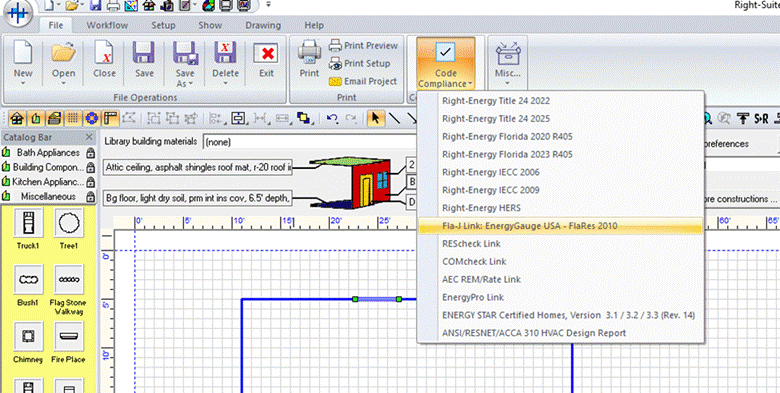
In RSU, go to File > Code Compliance and select Fla-J Link: Energy Gauge USA-FlaRes 2010.
Step 2: Choose a folder for the export
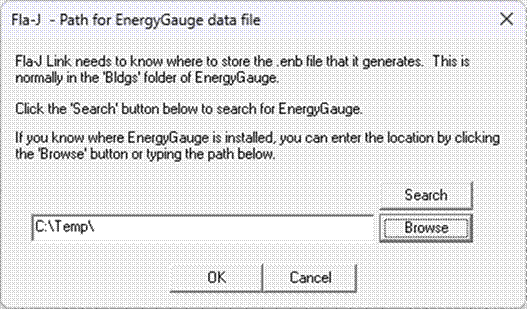
Click the Browse button, select the folder you want to export to, and click OK.
Step 3: Write the .enb file
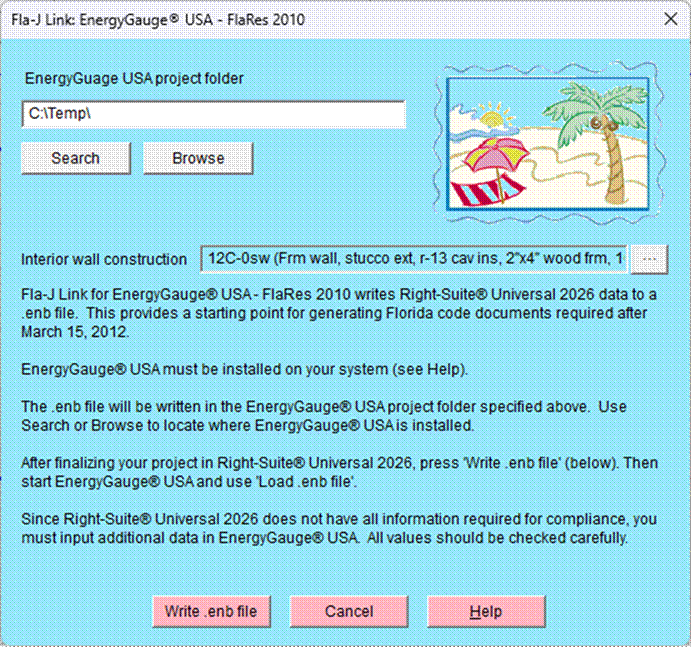
Click the Write .enb file button. RSU creates the .enb file in the folder you selected in the previous step.
Step 4: Import the .enb file into Ekotrope
Open your My Projects page in Ekotrope, click Import from Other Software at the bottom of the page, and select the .enb file you just created. You can import up to 50 .enb files at a time.
For the full import walkthrough and a list of known conversion discrepancies, see the EnergyGauge to Ekotrope Importer article.
Was this article helpful?
That’s Great!
Thank you for your feedback
Sorry! We couldn't be helpful
Thank you for your feedback
Feedback sent
We appreciate your effort and will try to fix the article